

So you’ve got workloads in Microsoft 365 and Azure. You’ve got policies. Maybe even a lovingly neglected Defender dashboard that’s been flashing red alerts like a Christmas tree for months, and nobody's dared open it since the intern rage-quit. And in the middle of all this glorious mess, CISA casually drops a tool in your lap: SCUBA Gear.
But what is it really?
Another YAML-fueled ritual of despair?
A gov-tool that feels allergic to anything modern?
Or the cloud audit sidekick you didn’t know you needed — that doesn’t upsell you halfway through doing its job?
Spoiler alert: it’s the last one.
🛠️ What the Hell is SCuBA Gear?

Straight from the bunker at the U.S. Cybersecurity and Infrastructure Security Agency (aka CISA — those nice folks constantly yelling "PATCH EVERYTHING NOW"), SCuBA Gear is described as:
A modular scanning tool that evaluates your cloud environment — specifically Azure and Microsoft 365 — against best practice baselines.
In plain human words? It’s a command-line beast that runs a deep check on your M365 and Azure configs, without needing a bloated portal, a vendor login, or a 17-step setup process that ends in an existential crisis.
Even better? It's not just one-size-fits-none. SCuBA Gear uses Microsoft’s own best practices and compliance resources to define its baselines — yes, the same ones Microsoft themselves publish in Secure Score and Compliance Manager. So when you run it, you're not just ticking boxes — you're measuring against what Microsoft and CISA both agree are the good ideas. Imagine that. Actual agreement. On the internet.
What’s more, SCuBA Gear isn’t trying to reinvent the wheel — it’s built with realistic, field-tested assumptions. It’s meant to be usable by any IT team, not just an elite squad of cloud ninja-architects. Whether you're at a federal agency or a scrappy K-12 district with three IT staff, two coffee machines, and a pile of overworked Chromebooks, SCuBA Gear meets you where you are — and gently shames your tenant.
Just point it at your tenant and whisper: “ARISE.” Bonus points if lightning cracks.
🧪 Why Should You Use It?
Because you don’t have time (or the will to live) to dig through:
- 999 Microsoft Learn articles written by 12 different teams in 3 different tones
- Entra ID defaults that make you scream into your hoodie
- and compliance tools that alert you to problems you can't actually fix without sacrificing your weekend and your sanity
SCUBA Gear makes that pain go away:
- It checks your Microsoft 365 and Azure setups against battle-tested, CISA-approved baselines.
- It works offline — zero phoning home, zero sales reps suddenly “checking in.”
- It throws out JSON, HTML or CSV reports you can actually use — whether that’s alerting via Sentinel or shoving into Power BI for your next oh-god-why dashboard.
And if you're in the public sector (or support public sector orgs), this thing isn’t just useful — it’s practically blessed. CISA specifically tailored these baselines to the challenges facing federal agencies, schools, local governments, and critical infrastructure. If you’re running a town’s IT on expired duct tape, unpaid overtime, and a OneDrive full of ransomware-laced Excel files, SCuBA might just save your bacon.
According to Microsoft, SCuBA Gear provides “measurable, evidence-based recommendations,” helping organizations focus efforts and budget on the things that actually matter, not just what looks good on a colorful dashboard that nobody checks after the quarterly review.
Cloudcook calls it: “Microsoft Secure Score’s cool, useful cousin that doesn’t gaslight you.”
🔍 What It Can Check (in the Microsoft World)
Here’s just a slice of the config sins SCuBA Gear helps you catch:
🔹 Azure / Entra ID
- Is MFA actually enforced, or just something your policy claims to do?
- How many global admins do you really need? (Spoiler: it’s not 12. Or 8. Or 5.)
- Guest access policies that are stuck in 2017 and smell like regret.
- Subscription policy enforcement that sounds fancy but does absolutely zilch.
🔹 Microsoft 365
- Exchange Online config that might allow mail flow from the dark corners of the internet.
- Teams guest sharing that turns collaboration into chaos.
- SharePoint access settings that let Karen from Accounting see DevSecOps folders she really shouldn't.
- Whether Defender for Office 365 is protecting or just pretending.
In short: SCuBA Gear digs up all the stuff your auditors asked about, your CISO forgot about, and your admin quietly ignored because they were too busy fixing printers over VPN.
🧹 Integration Possibilities
SCUBA Gear plays surprisingly well with others. Want to level up your paranoia? Try this:
- Drop it into a GitHub Action or Azure DevOps pipeline. Automate config hygiene before your cloud turns into a compliance crime scene.
- Pipe the results to a Teams webhook. Bonus: instant alerts that make coffee shoot out of your nose.
- Funnel data into Sentinel, Defender XDR, or a Power BI dashboard to generate beautifully terrifying graphs.
- Schedule it via Logic App, if you’re fancy and call it “continuous compliance” with a straight face and a dead soul.
💡 Cloudcook tip: Set SCuBA Gear to scan your M365 tenant every Friday at noon. Save the report as m365-sins.json. Present it dramatically in the Monday standup like it’s the Ark of the Covenant.
🛟️ Cautions Before You Go Diving
SCuBA Gear’s great, but like all open-source tools, there are a few caveats:
- It’s still growing. Expect a few sharp edges and the occasional "what even is this baseline?" moment.
- You’ll need proper permissions. No global admin? No insights. But also, don’t give it God-mode unless you like living on the edge.
- It sticks to CISA baselines. These are solid, but not tailored to your specific “we built everything in a trial tenant and forgot” architecture.
- It points, it doesn’t patch. You still have to fix things yourself — but at least now you know what to scream about in your next change advisory board meeting.
Bonus round: SCUBA Gear helps with audit prep — especially for orgs chasing acronyms that haunt your dreams. It provides real data, real evidence, and real relief for whoever's stuck making the compliance report not look like a ransom note.
🏎️How to use it
First, i was not sure if i should mention on how to run SCuBA Gear, but then i thought about all of those lazy people (like me 😅) who don't wont to read different Blogs or Sites. So here it is:
To install ScubaGear from PSGallery, open a PowerShell 5 terminal on a Windows computer and install the module:
# Install ScubaGear
Install-Module -Name ScubaGear
To install its dependencies:
# Install the minimum required dependencies
Initialize-SCuBA
To verify that it is installed:
# Check the version
Invoke-SCuBA -Version
To run ScubaGear:
# Assess all products
Invoke-SCuBA -ProductNames *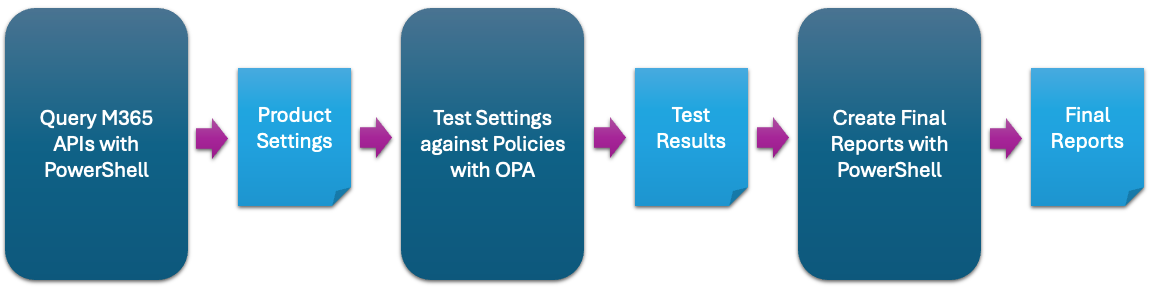
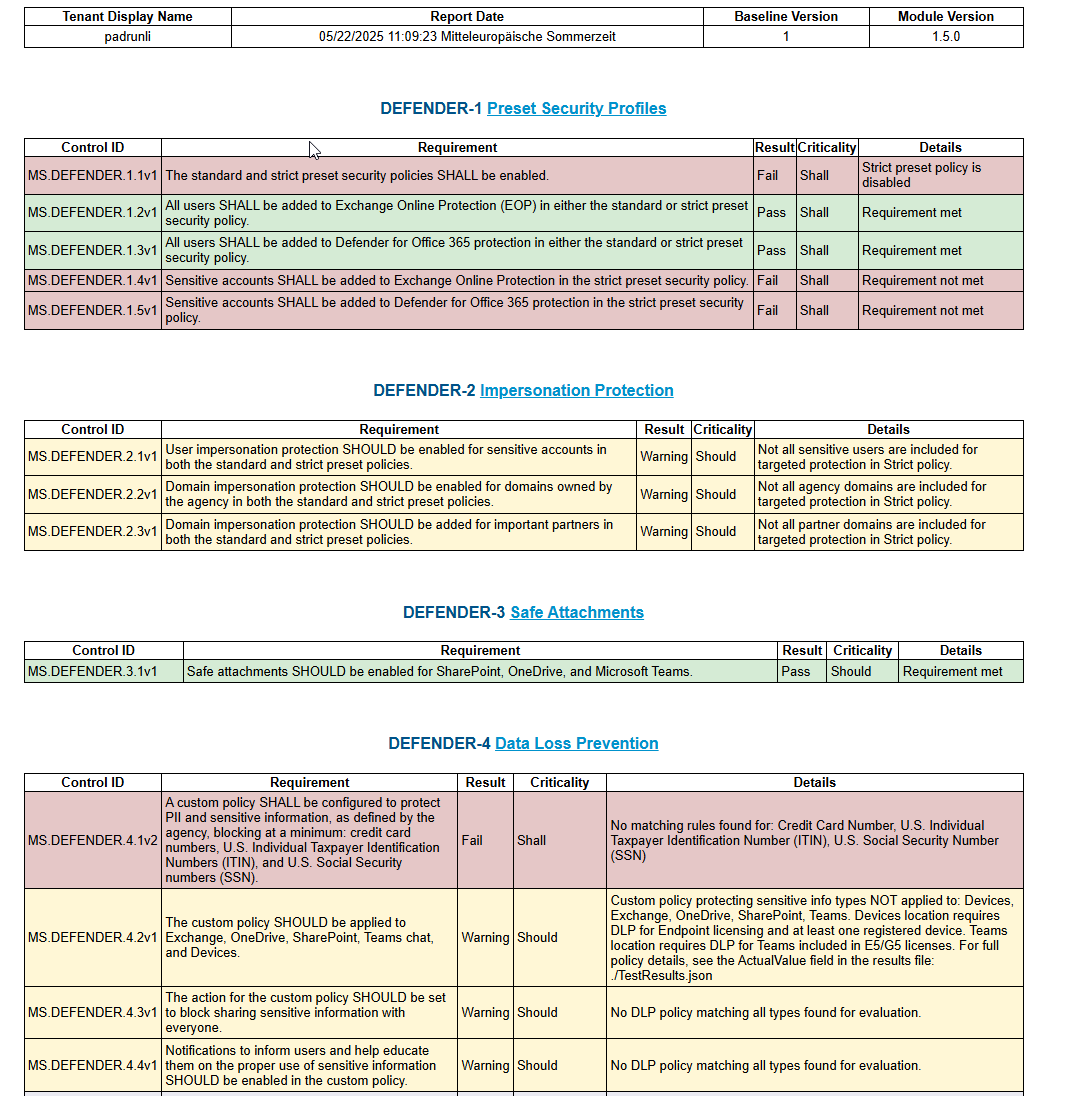
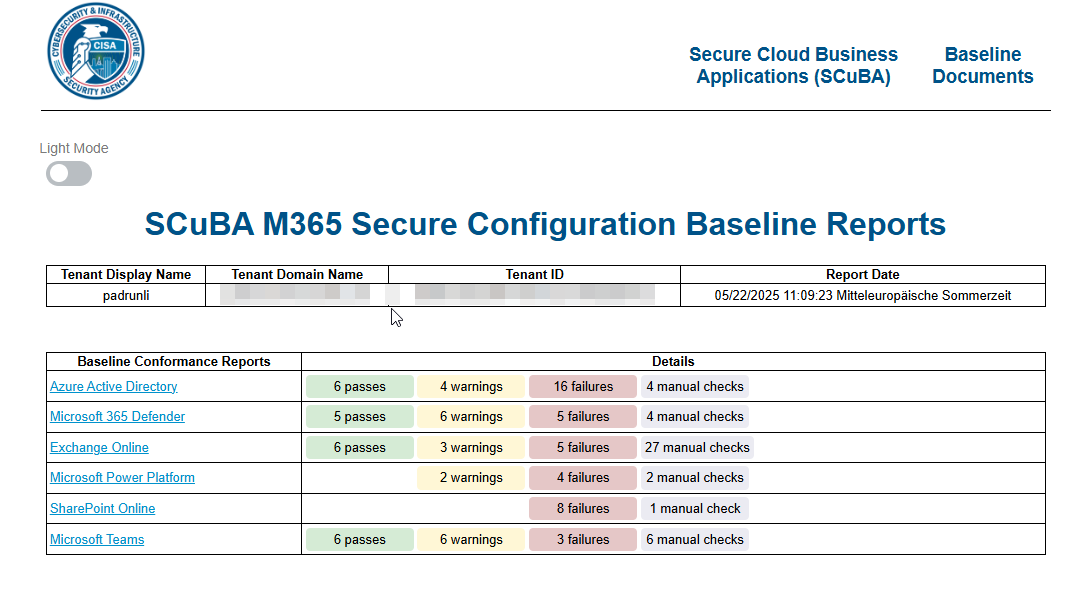
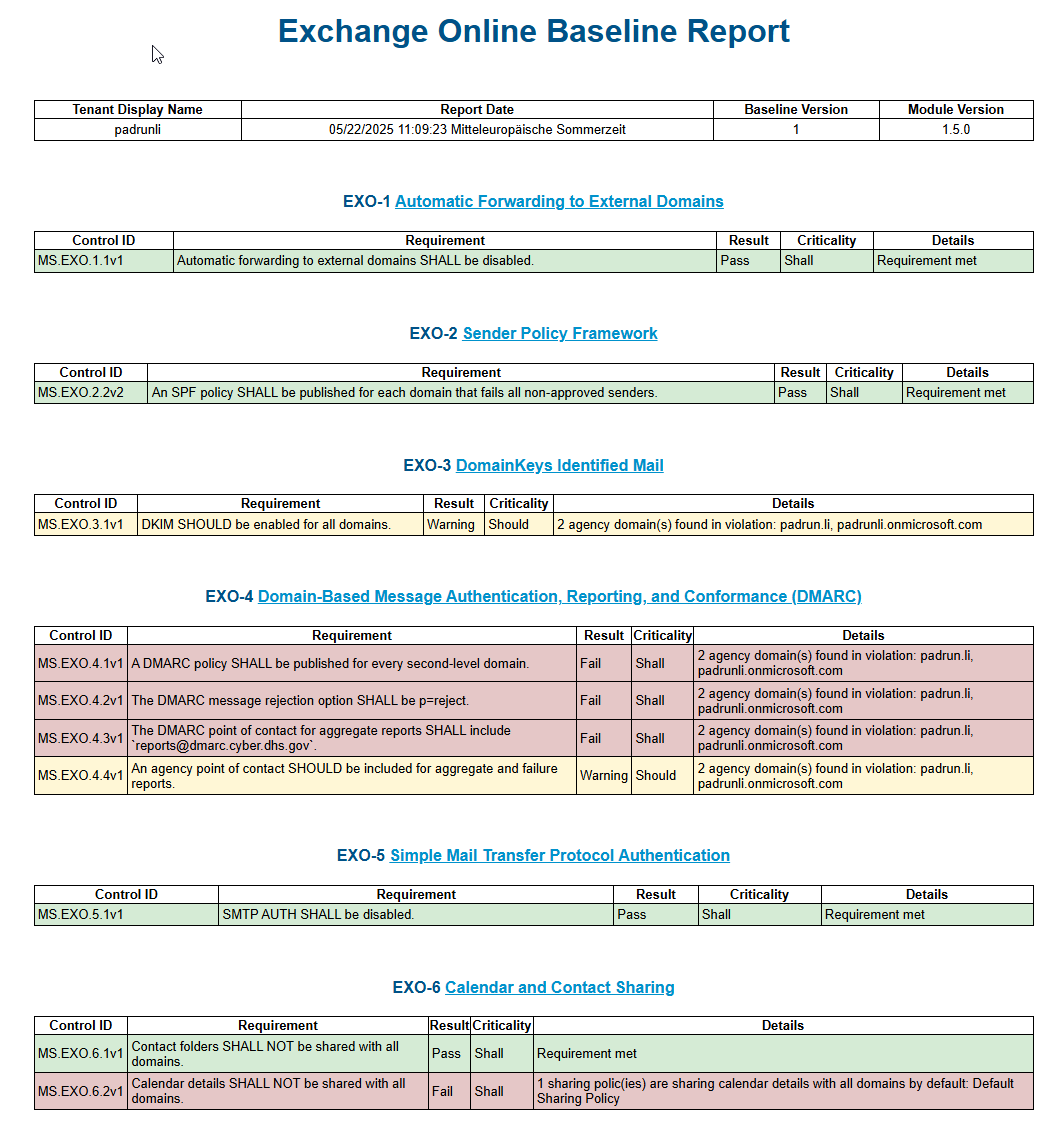
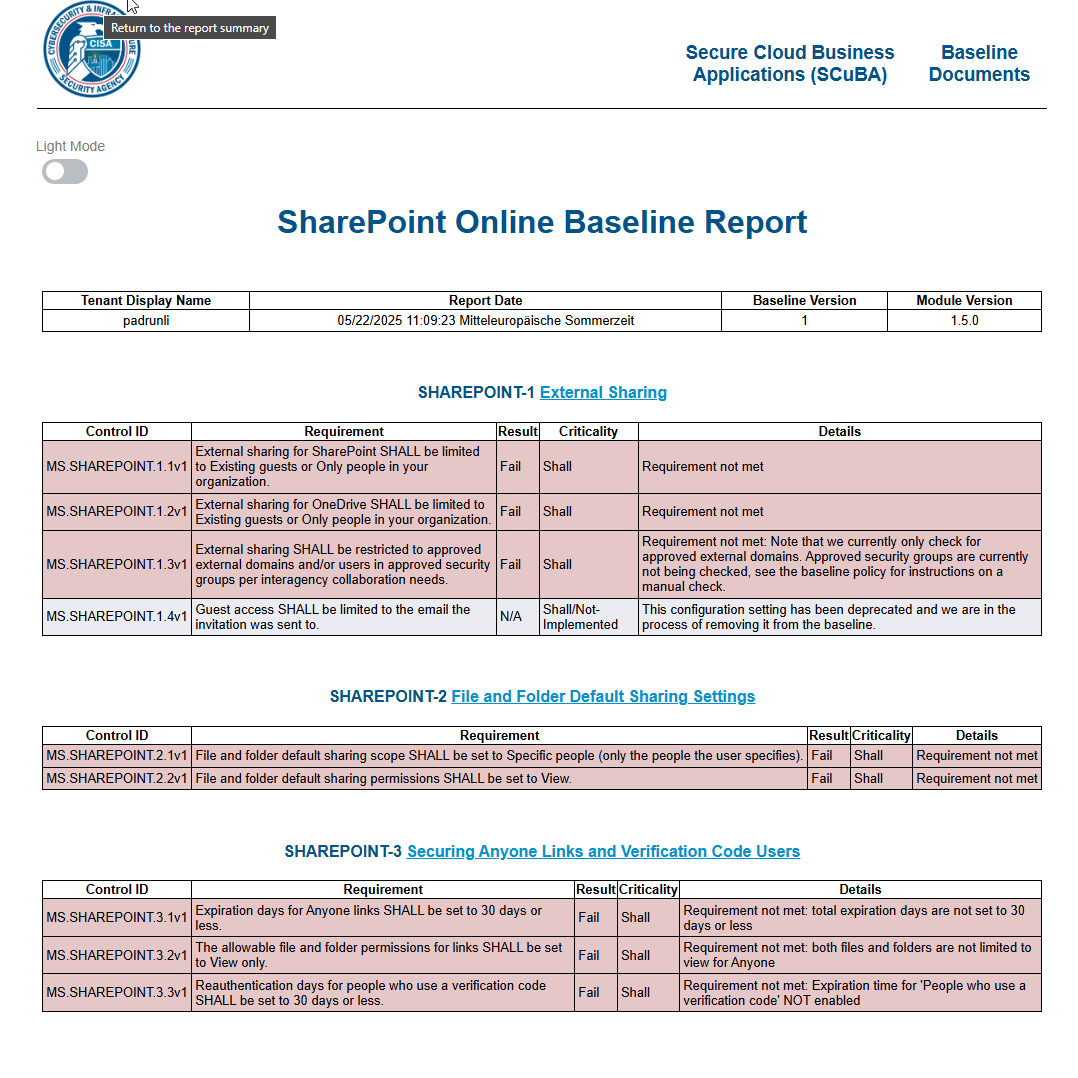
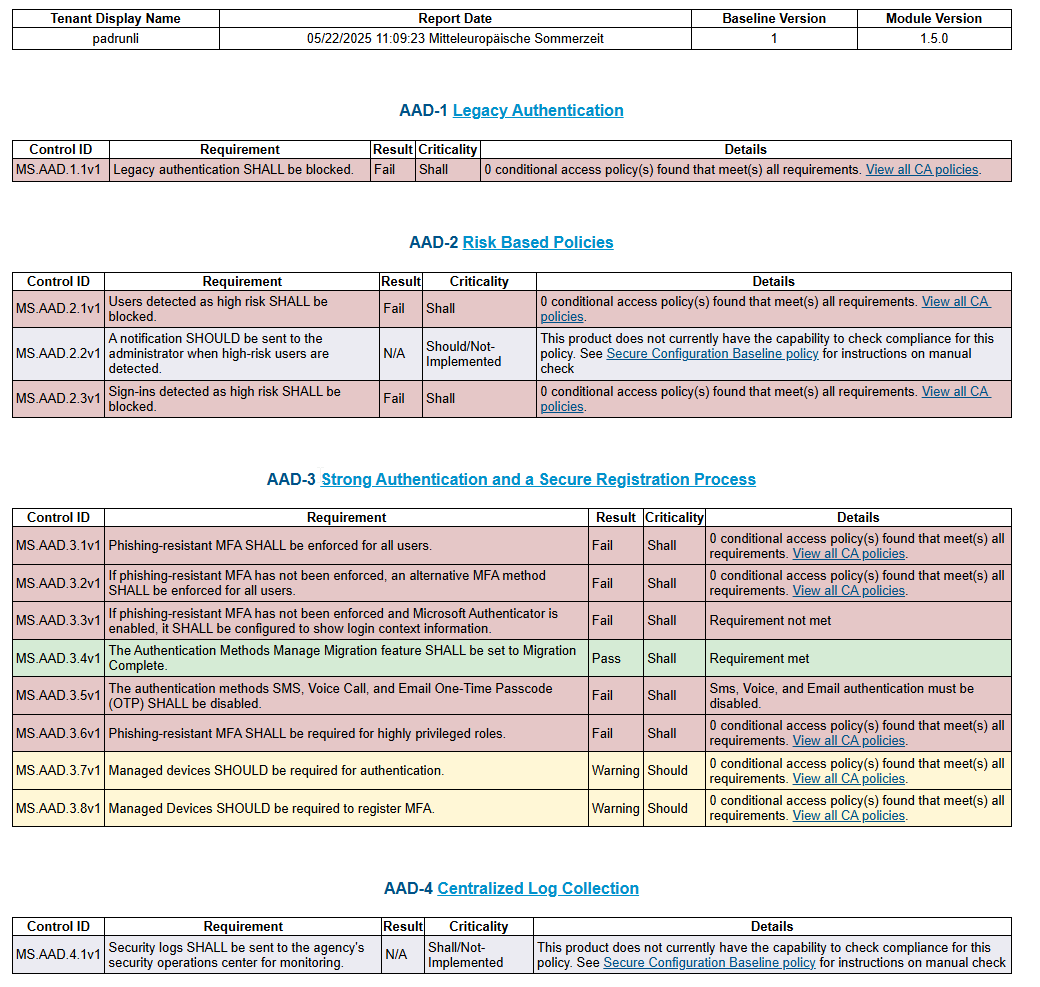
Imagine now, you are fully done with the process, how will it look like?
🏋️♂️ TL;DR for Lazy But Smart People
| Feature | What SCUBA Gear Delivers |
|---|---|
| Azure/M365 Assessment | ✅ Baseline config checks |
| Offline Capable | ✅ Doesn’t leak your data to the abyss |
| JSON Reports | ✅ SIEM & dashboard friendly |
| Setup Effort | ⏱️ Under 15 minutes if you can type |
| Price Tag | 💸 Free, and no “Enterprise Edition” |
| HTML Reports | ✅ All coloured so even the dumbest of them all can read it |
🧙♂️ Cloudcook's Final Rant
“This is the kind of tool I begged for back in the dark days — when we manually clicked through Azure blades like caffeinated squirrels and hoped nobody asked ‘how secure are we?’ SCUBA Gear doesn’t fix everything, but it gives you a brutally honest snapshot — and doesn’t charge per insight.”
Install it. Run it. Let the HTML scream at you.